Breaking through!
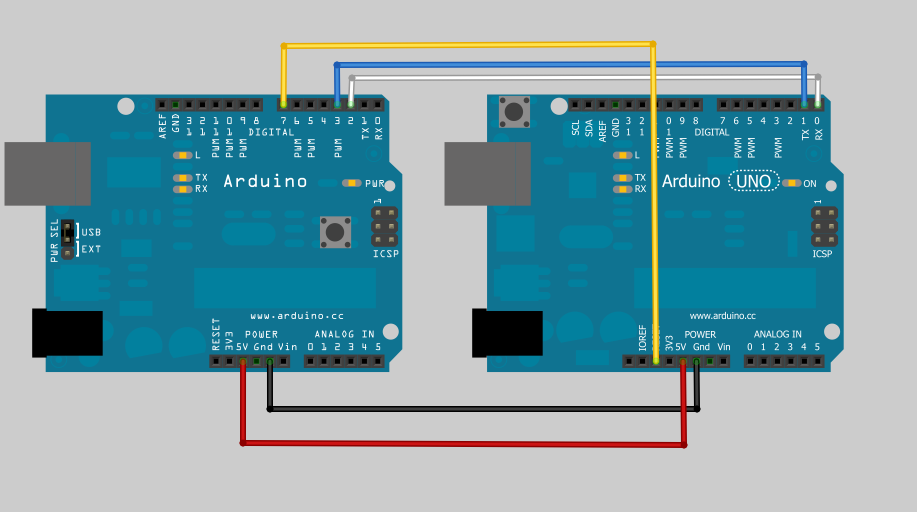
It’s been a while since the last update, but some progress has been made. I discovered that SoftwareSerial library doesn’t work really well at 115200 baud, so I switched the wiring around to use software serial for debugging, and the hardware uart pins (Arduino pins 1 and 2) to talk to the bootloader on the target. This is a little bit of a pain, as you have to unplug the connection to the target to download code to the “programmer” but it does work now.
I had a little trouble getting sensible responses from the bootloader until I put in a delay after resetting. In retrospect this makes sense as the AVRdude code reminded me that there are capacitors on the Arduino reset line. I was probably trying to talk too soon.
What bootloader, speed, protocol?
There have been several different bootloaders in the history of Arduino, and the source code for the current “canonical” loaders is included in the Arduino software distribution. The bootloader is a little piece of code that allows you to program the flash memory of the Arduino’s atmega328p via serial or USB instead of using an ICSP programmer. These bootloaders implement a subset of the STK500 8bit protocol (not to be confused with STK500v2) which is documented at www.atmel.com/atmel/acrobat/doc2525.pdf
Arduino MEGA (1280 and 2560) use yet another bootloader, one that uses the stk500v2 protocol instead.
The source code for the bootloader used by the diecimila, duemilanove, and a few other clones is in …\arduino-1.0\hardware\arduino\bootloaders\atmega. Many clones use this, or a variant hacked by Lady Ada (Limor Fried).
The UNO and other later Arduino variants use a much smaller bootloader called Optiboot (more room for your code!). A little secret is that you can actually burn this bootloader into your older arduinos (at least at atmega168 and greater) and then just refer to the board as an UNO.
Adafruit Forum user westfw (one of /the?) author of optiboot points out:
Optiboot also supports the mega8. However, you can only call a board an Uno if it at has a m328 cpu in it. For m8 and m168s with optiboot, you’ll need to make a new entry in boards.txt that copies the Uno bootloader parameters, but has the correct “build.mcu” specification (and fuses, if you want to program the bootloader using the IDE.)
The code for this is in …\arduino-1.0\hardware\arduino\bootloaders\optiboot. If you need to change the processor or baud rate, the settings are in the Makefile. This version is very stripped down, and doesn’t support, for example, writing to EEPROM. I’m choosing to use this as my initial target. Most of the code will still work on the older bootloader, but may require a slightly different command set.
The latest and greatest optiboot can be found at it’s Google code site: http://code.google.com/p/optiboot/
Which is also the preferred place for bug reports and to check for newer versions (atmega1284 is now supported!)
Because of varying clock rates, and different bootloader code, the various boards use different baud rates to talk to the IDE. This information is found in the …\arduino-1.0\hardware\arduino\boards.txt file. The UNO programs at 115200 baud, the Duemilanove (with ATmega328p) programs at 57600 baud. The Diecemila or Duemilanove with ATmega168 programs at 19200 baud.
Looking at the actual protocol
After the Arduino IDE compiles everything down to a intel hex file for downloading to the target Arduino, it uses the avrdude command to program the Arduino. The upload protocol is also specified in the boards.txt file and is called arduino, which is a slight variant of avrdude’s stk500 protocol. Most of the commands are from the stk500 module, except the signature reading is slightly different. For now, I’m adapting the avrdude code directly for the Arduino. This requires some minor porting (eliminating fprintfs, removing some of the indirection that links it to the avrdude programmer framework). I may simplify some of this code later as I’m a little nervous about running out of room.
As I mentioned in my last post, I downloaded a trial version of AGG Software’s Advanced Serial Port Monitor, and recorded the conversation between avrdude (controlled by the Arduino IDE) and the UNO target board. I stayed up late last night annotating the conversation:
DTR and RTS are both toggled from High to low several times
Avrdude then sends the GET_SYNCH command, thows away whatever comes back and sends it again a couple of times
Avrdude/Arduino IDE:#30#20 STK_GET_SYNCH, Sync_CRC_EOP
Target/Arduino UNO: #14#10 STK_INSYNC, STK_OK
Avrdude/Arduino IDE: #30#20 STK_GET_SYNCH, Sync_CRC_EOP
Target/Arduino UNO: #14#10 STK_INSYNC, STK_OK
Avrdude/Arduino IDE: #30#20 STK_GET_SYNCH, Sync_CRC_EOP
Target/Arduino UNO: #14#10 STK_INSYNC, STK_OK
Get the version number of the bootloader (in this case it’s 4.4) we could use this to branch to different variants of protocol.
Avrdude/Arduino IDE: #41#81#20 STK_GET_PARAMETER, STK_SW_MAJOR, SYNC,CRC_EOP
Target/Arduino UNO: #14#04#10 STK_INSYNC, 0x04, STK_OK
Avrdude/Arduino IDE: #41#82#20 STK_GET_PARAMETER, STK_SW_MINOR, SYNC_CRC_EOP
Target/Arduino UNO: #14#04#10 STK_INSYNC, 0x04, STK_OK
The next two commands are consumed but ignored (probably used by a real programmer to retrieve device specific stuff.)
Avrdude/Arduino IDE: #42#86#00#00#01#01#01#01#03#FF#FF#FF#FF#00#80#04#00#00#00#80#00#20(This is a STK_SET_DEVICE Command that is consumed but ignored by the bootloader)
Target/Arduino UNO: #14#10 STK_INSYNC, STK_OK
Avrdude/Arduino IDE: #45#05#04#D7#C2#00#20 STK_SET_DEVICE_EXT (also ignored)
Target/Arduino UNO: #14#10 STK_INSYNC, STK_OK
Enter Programming mode.
Avrdude/Arduino IDE: #50#20 STK_ENTER_PROGMODE, SYNC_CRC_EOP
Target/Arduino UNO: #14#10 STK_INSYNC, STK_OK
Avrdude/Arduino IDE: #75#20 STK_READ_SIGN, SYNC_CRC_EOP (read device signature)
Target/Arduino UNO: #14#1E#95#0F#10 STK_INSYNC, (three byte signature), STK_OK
The next four commands are consumed but ignored. I won’t bother to reproduce them in my code.
Avrdude/Arduino IDE: #56#A0#03#FC#00#20 STK_UNIVERSAL,0xA0,0x03,0xFC,0x00 SYNC_CRC_EOP (This is a pass through command that is supposed to be used to perform arbitrary native SPI commands. In this case, and the next 3, they are Read EEPROM byte commands They are consumed but ignored by the bootloader)
Target/Arduino UNO: #14#00#10 STK_INSYNC, (last byte written by the Universal command, STK_OK
Avrdude/Arduino IDE: #56#A0#03#FD#00#20 STK_UNIVERSAL,0xA0,0x03,0xFD,0x00,SYNC_CRC_EOP (Ignored by the bootloader)
Target/Arduino UNO: #14#00#10 STK_INSYNC, (last byte written by the Universal command, STK_OK
Avrdude/Arduino IDE: #56#A0#03#FE#00#20 STK_UNIVERSAL, 0xA0,0x03,0xFE,0x00,SYNC_CRC_EOP (Ignored by the bootloader)
Target/Arduino UNO: #14#00#10 STK_INSYNC, (last byte written by the Universal command, STK_OK
Avrdude/Arduino IDE: #56#A0#03#FF#00#20 STK_UNIVERSAL, 0xA0,0x03,0xFF,0x00,SYNC_CRC_EOP (Ignored by the bootloader)
Target/Arduino UNO: #14#00#10 STK_INSYNC, (last byte written by the Universal command, STK_OK
Here’s where we actually get started. This specifies the address in Flash where the follwoing PROGRAM_PAGE data goes.
Avrdude/Arduino IDE: #55#00#00#20 STK_LOAD_ADDRESS, 0x0000, SYNC_CRC_EOP
Target/Arduino UNO: #14#10 STK_INSYNC, STK_OK
And then the actual data. Note that the data is in the same order as the bytes in the Intel Hex file
Avrdude/Arduino IDE:
#64#00#80#46#0C#94#61#00#0C#94#7E#00#0C#94#7E#00#0C#94#7E#00#0C
#94#7E#00#0C#94#7E#00#0C#94#7E#00#0C#94#7E#00#0C#94#7E#00#0C#94
#7E#00#0C#94#7E#00#0C#94#7E#00#0C#94#7E#00#0C#94#7E#00#0C#94#7E
#00#0C#94#7E#00#0C#94#9A#00#0C#94#7E#00#0C#94#7E#00#0C#94#7E#00
#0C#94#7E#00#0C#94#7E#00#0C#94#7E#00#0C#94#7E#00#0C#94#7E#00#0C
#94#7E#00#00#00#00#00#24#00#27#00#2A#00#00#00#00#00#25#00#28#00#2B
#00#00#00#00#00#20
STK_PROGRAM_PAGE, 0x0080 (page size), ‘F'(flash memory), data bytes…,SYNC_CRC_EOP
Target/Arduino UNO: #14#10 STK_INSYNC, STK_OK
And then we repeat – set address, program page, etc.
Avrdude/Arduino IDE: #55#40#00#20 STK_LOAD_ADDRESS, 0x0040, SYNC_CRC_EOP
Target/Arduino UNO: #14#10 STK_INSYNC, STK_OK
Avrdude/Arduino IDE: STK_PROGRAM_PAGE, 0x0080 (page size), ‘F'(flash memory), data bytes….,SYNC_CRC_EOP
Target/Arduino UNO: #14#10 STK_INSYNC, STK_OK
.
.
.
Then it reads several pages (probably to verify what it wrote)
Avrdude/Arduino IDE: #55#00#00#20 STK_LOAD_ADDRESS, 0x0000,SYNC_CRC_EOP
Target/Arduino UNO: #14#10 STK_INSYNC, STK_OK
Avrdude/Arduino IDE: #74#00#80#46#20 STK_READ_PAGE,0x0080 bytes, ‘F’ for flash, SYNC_CRC_EOP
Target/Arduino UNO #14 STK_INSYNC
Target/Arduino UNO #14#10 STK_INSYNC, STK_OK
#0C#94#61#00#0C#94#7E#00#0C#94#7E#00#0C#94#7E#00#0C#94#7E#00#0C#94#7E
#00#0C#94#7E#00#0C#94#7E#00#0C#94#7E#00#0C#94#7E#00#0C#94#7E#00#0C#94
#7E#00#0C#94#7E#00#0C#94#7E#00#0C#94#7E#00#0C#94#7E#00#0C#94#9A#00#0C
#94#7E#00#0C#94#7E#00#0C#94#7E#00#0C#94#7E#00#0C#94#7E#00#0C#94#7E#00
#0C#94#7E#00#0C#94#7E#00#0C#94#7E#00#00#00#00#00#24#00#27#00#2A#00#00
#00#00#00#25#00#28#00#2B#00#00#00#00#00
#10 STK_OK
repeat several times at different addresses
.
.
And then leaves programming mode
Avrdude/Arduino IDE: #51#20 STK_LEAVE_PROGMODE, SYNC_CRC_EOP
Target/Arduino UNO #14#10 STK_INSYNC, STK_OK
Then we’re done! Avrdude then toggles DTR/RTS to reset
 I’m putting the Auto-programmer on hold to make …. drum roll please…. The Boot Drive for Arduino!